Hi people,
I've put together a compilation of some articles and the ones that I plan to come up with pretty soon. This is an open post where all can request any topic they feel that needs to be discussed upon or written about. The topics taken care of will be removed from this list from time to time. The posted articles can be searched and accessed using the labels and categories on the lhs.
What's New?
Static at namespace scope deprecated
Coming soon
Database Normalization
ACID property
Curiously Recurring Template Pattern
Reference Counting (C++)
Please feel free to add any technical topic you want to be discussed in the comments section and i'll be adding any of your wishes here...
Tuesday, April 15, 2008
What's New? What's In Store?

Friday, April 11, 2008
Thursday, April 10, 2008
Regular Expressions I (Perl)
Scope
This post discusses the regex with respect to Perl 5.8.7 Any changes in the later versions are not in the scope of this document. You may anyhow point out any anomaly in the post so that I can incorporate the same or come up with an errata.
Introduction
Regular expression is an expression string that describes a pattern representing a set of strings without listing them all. These regex are put to use in several areas in the computing realm. The best example will be the usage in searching for files and directories using wildcards.
Glossary
Here's a set of symbols and terms that'll be the part of post lingo.
$literalName --> Represents a scalar data type in Perl which can accept values irrespective of it being a number or a string.
@literalName --> Represents a list/array data type in Perl.
$_ --> Better known as "default input and pattern matching space" is the default global variable which gets populated generally during looping if no variable is specified.
@languageList = {"Perl", "C++", "Java"};
foreach (@languageList) {
    print "Language : ".$_."\n";
}Word matching
We'd start with a piece of Perl code and then analyze what's going on.
"Rajan Karol" =~ /Karol/;
We could replace the string literal with a variable. A variant to this can use operator !~ for a negative testing scenario like.
$string = "Rajan Karol";
print "No match\n" if $string !~ /Karol/;
$_ = "Rajan Karol";
print "No match\n" if /Karol/; # prints No Match if 'Karol' is not found in default variable.
"/usr/bin/java" =~ m!/java!; # match, delimited by '!'
"/usr/bin/java" =~ m{/java}; # match, delimited by '{}'
"/usr/bin/java" =~ m"/java"; # match, delimited by '"'
A metacharacter can be matched by escaping it by putting a backslash before it. infact a forward slash is also supposed to ve backslashed in order to be matched because it delimits a regex.
"Language C++" =~ /C++/; # flagged as syntax error.
"Language C++" =~ /C\+\+/; # matches as + is escaped
"The open interval [0,1)." =~ /[0,1)./     # syntax error!
"The open interval [0,1)." =~ /\[0,1\)\./  # matches
Where to find a match in the string
One can specify the location in the string where pattern match is required. This is done with the help of anchor metacharacters ^ $ and word anchor metacharacters \b \B.
^ – matches pattern occurring at the beginning of the string.
$ – matches pattern at the end of the string, or before a newline at the end of the string.
\b – matches pattern at the boundary of word in string. In other words, matches a boundary between a word character and a non-word character \w\W or \W\w.
\B – matches pattern not at the boundary of words.
So if we presume the default variable $_ to be "Matching patterns in string\n"
/^Match/; # look for ‘Match’ at the start of string
/string$/; # look for ‘string’ at the end of string
/^Matching patterns in string$/; # complete string match
"" =~ /^$/; # ^$ matches an empty string
/\bpat/; # words starting with ‘pat’
/ing\b/; # words ending in ‘ing’
/\Bpat/; # words not starting with ‘pat’
Matching against a set
A character class comes to our rescue when we want to match with a set of possible characters rather than a single character to match at a particular point in the regex. Character classes are denoted by brackets [...] , with the set of characters to be possibly matched inside or by their corresponding abbreviated names.
\d is a digit and represents [0-9] - Matches a single digit.
\s is a whitespace character and represents [\ \t\r\n\f] - Matched a space character.
\w is a word character (alphanumeric or _) and represents [0-9a-zA-Z_]
\D is a negated \d; it represents any character but a digit [^0-9]
\S is a negated \s; it represents any non-whitespace character [^\s]
\W is a negated \w; it represents any non-word character [^\w]
The period '.' matches any character but "\n"
/[cb]ol[td]/; # matches colt bolt cold bold
"cat" =~ /[atc]/; # matches c as the match is made per position.
/[rR][aA][jJ]/ # matches case insensitive versions of Raj
/raj/i # uses the 'i' modifier to achieve the same effect
Character classes also have special characters, but the sets of ordinary and special characters inside a character class are different than those outside a character class. The special characters for a character class are - ] \ ^ $ and are matched using an escape.
- character is used as a range operator in a character class. '-' at the beginning or end of the class acts as an ordinary character.
] represents end of a character class.
$ denotes a scalar variable.
\ escapes sequences.
^ The special character '^' in the first position of a character class denotes a negated character class, which matches any character but those in the brackets.
$x = 'bcr';
/[\]c]at/;        # matches ']at' or 'cat'
/[$x]at/;         # matches 'bat, 'cat', or 'rat'
/[\$x]at/;        # $ is escaped so matches '$at'
                  # or 'xat'
/[\\$x]at/;       # \ is esaceped so matches '\at',
                  # 'bat, 'cat', or 'rat'
/[0-9a-fA-F]/;    # matches a hexadecimal digit
/[^a]at/;         # doesn't match 'aat' or 'at',
                  # but matches all other 'bat',
                  # 'cat, '0at', '%at', etc.
/[^0-9]/;         # matches a non-numeric character
/[a^]at/;         # matches 'aat' or '^at'; here '^'
                  # is ordinary
/\d\d:\d\d:\d\d/; # matches a hh:mm:ss time format
/[\d\s]/;         # matches any digit or whitespace
                  # character
/end\./;          # matches 'end.'
Type the rest of your post here.
Monday, April 7, 2008
Static at namespace scope deprecated
Scope
The primary objective of the post is discuss the deprecated declaration of static names at a namespace scope, its alternative and any caveats to the same.
Introduction
The question that arises in the naive mind is: What did we achieve by declaring a name in the declarative region of a namespace with a static keyword? The the answer that follows after some introspection is: Of course limiting the scope of the name from its point of declaration in the namespace to the end of the translation unit/ the declarative region of the namespace.
If that were the case then, what are we losing by such a language feature that it needs to be deprecated? Are there some alternatives to the same? Is the 'thing' altogether gone...
These are some of the questions that i'll try to answer in the discussion that follows.
Why deprecated?
The use of the keyword static to limit the scope of external variables is deprecated for declaring objects in namespace scope. It is known that static in the declaration of such objects means that the name has internal linkage, hence limiting the scope to the translation unit in which it is defined. This however prevents the usage of the name as a non type template argument for a template instantiation. When a template class or function is instantiated, the name or value of its template parameters is used to generate a linkage name for the template instance. The internal linkage for the static object prevents this. Just to give an example consider the code snippet below.
template<typename T, int SIZE>

class Array

{

private:

 T *mArray;

 enum { kSize = SIZE };

};


const int gSize = 5;

Array<int, gSize> IntegerArrayGSize; // Valid


static int sSize = 6;

Array<int, sSize> IntegerArraySSize; // C2970 cannot use static variable in templates
Gone forever?
Doesn't seem to be feasible in distant future :). There might be reasons to still carry on with the feature. Go on and read further...
. Even the Standard doesn't follow it's own guidelines. To cite the Standard 9.5.3 "Anonymous unions declared in a named namespace or the global namespace shall be declared static".
. It implicitly declares quoted literals as static.
. Static is the key for its compatibility with C which lacked namespaces, and we all know we cannot introduce the same in C.
. Because templates may be instantiated on members of unnamed namespaces, some compilation systems may place such symbols in the global linker space, which could place a significant burden on the linker. Without static, programmers have no mechanism to avoid the burden.
Conclusion
The use of static as of now stands deprecated as per the C++ standard and the alternative suggested for the purpose is to define the member inside an unnamed namespace.
References
[1] informIT - C++ Reference Guide (Deprecated Features)
[2] C++ Standard
[3] C++ Standard core language issues closed
Thursday, April 3, 2008
The Dominance Rule
Scope
The Dominance Rule in this article discusses the rule that disambiguates the name resolution in a virtual inheritance in C++.
Dominance Rule
In a multiple inheritance hierarchy it's possible to have ambiguous meanings to a name(object, function, typedef or enumerator), visible through an inheritance graph. This problem creeps its head irrespective of the inheritance being virtual or non-virtual, unless of course dominance comes as a saviour.
Dominance states that a name resolution in an inheritance hierachy goes bottom up and the specificity is determined by the dynamic type of the object refering the name. In other words a name is dominanting if its defined in both the classes where one class derives from the other, and the one in the derived class dominates.
Case I: In a multiple inheritance scenario where only one of the derived classes B overrides the base class identifier 'name', the definition is available in the most derived object D through two different paths. The first definition is that from the derived class B that overrides the base class A's definition, and the second from the base class A through the alternate path. Here the lookup for 'name is ambiguous as B::name doesn't dominate A::name in the base class C.No dominance: B::name hides A::name
on one path but not on the other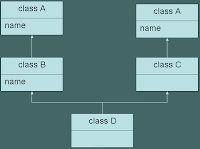
Case II: In a virtual inheritance scenario where both the derived classes B and C overrides the base class identifier 'name' definition, the same is available in the most derived object D through two different paths. The again is ambiguous.This is ambiguous as B::name and C::name
hides A::name on respective paths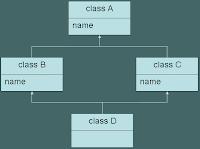
Case III: Let's consider the case where dominance comes into play. If the scenario in Case I was that of virtual inheritance then the definition of B::name would dominate that of A::name coming from a single shared subobject A. Hence the access would not be ambiguousB::name dominates A::name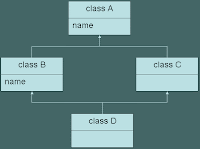
Dominance needs care
Dominance can indeed play a spoil sport if not heeded to. Consider the code snippet below.This example illustrates the prominance of the dominance rule in the name lookup for a virtual inheritance hierarchy. Since the name lookup goes bottom up, the name x and y are resolved as a typedef and and integer respectively. This leads to a correct interpretation for the expression x y, while y x is flagged as a compile time error.class A
{
public:
int x;
typedef int y;
};
class B : public virtual A
{
public:
typedef int x;
int y;
};
class C : public B, public virtual A
{
public:
x y; // Works fine as B::x dominates A::x
// so x acts as typdef, and the
// statement as a declaration.
y x; // Error: Flagged as a compile time error
// as B::y dominates A::y and hence y
// is interpreted as an integer.
};
References
[1] Dominance Rule - MSDN
[2] C++ Gotcha #79 - Dominance Issues
Wednesday, April 2, 2008
ACID Property
Introduction
Reliabilty is a property that each database management system thrives to achieve. Certain characteristics of such a database are Atomicity, Consistency, Isolation, Durability in short ACID. These properties ensure that all the database transactions are reliably processed.
A transaction for that matter might consist of a number of atomic operatations, the completion of which make the transaction successful. Lets peek into all these characteristics which aim to make a db transaction reliable.
Atomicity - This property suggests that the DBMS should guarantee that either all or none of the actions of a transaction are performed. i.e. it either commits the entire transaction or rollbacks any actions performed from the beginning of the transaction in case of a failure.
Consistency This property ensures that the database remains in consistent state before and after the transaction (inspite of it being successful or not)
Isolation Ability to make operations in a transaction isolated from the other operations, thus making the transaction history serializable.
Durability Refers to the guarantee that once the user has been notified of success, the transaction will persist, and not be undone. This means it will survive system failure, i.e. a transaction is deemed comitted after it is safely in the log which is used to recreate the system state before the failure.
Techniques to implement ACID
There are two techniques to implement ACID.
Write ahead logging - Logs transaction actions and writes to the database only on commit.
Shadow Paging - Updates are applied to the copy of the database and the new copy is activated when transaction commits.
Both these techniques require aquiring locks. Alternative to locking is multiversion concurrency control.
Subscribe to:
Posts (Atom)

What people said... (0)
Post a Comment